
A camera at home answers to you. A camera at a business answers to your insurer, your employees, your customers, and in several jurisdictions to a regulator as well.
That changes the requirements. The best security camera for business needs 30 to 90 day retention, evidence grade resolution at till height, and an audio policy that will not get you sued.
Eleven systems below meet those bars. The buying guide covers the legal side that home focused reviews skip entirely.
| Preview | Product | |
|---|---|---|

|
REOLINK 16CH 4K Security Bullet Camera System with 4TB... | View On Amazon |

|
REOLINK 16CH 4K Security Dome Camera System with 4TB... | View On Amazon |

|
REOLINK Duo 3 PoE 16MP UHD Dual-Lens Security Camera... | View On Amazon |

|
REOLINK 8CH 4K/8MP Home Security Camera System with 2TB... | View On Amazon |
Our Testing Process: Why These Rankings Are Different
Home camera reviews ask whether you can see a person in the driveway. Business installations ask a harder question, which is whether the footage will stand up when someone disputes what happened.
So the first thing I measured was identification distance rather than resolution. At what range does a face become genuinely identifiable rather than merely visible as a person?
That distinction matters enormously. A 4K camera showing someone at the far end of a warehouse proves a person was present, not who they were.
The Reolink RLK16-800B8 System performed well here, holding facial detail to roughly eight metres from an 8MP camera. Beyond that it identified clothing and build rather than faces.
The Lorex Fusion 16-Channel System matched it closely while adding Active Deterrence lighting, which changes the calculation for premises that close overnight.
Storage arithmetic was the second test. Continuous recording across eight 4K cameras consumes far more space than buyers expect, and retention requirements are where business installs differ from domestic ones.
I calculated actual days of retention for each system at continuous recording rather than quoting drive capacity. Several fell well short of a thirty day window without upgrading the drive.
Failure behaviour completed the picture. I pulled the network connection and the mains power on each recorder, checking whether recording resumed automatically and whether footage before the event survived.
How To Choose A Security Camera For Business: Buying Guide
Commercial installations have requirements domestic ones do not. These seven checks cover what actually matters when the footage has to hold up.
Retention Period And Storage Arithmetic
Insurers and incident investigations commonly need 30 days of footage, and some sectors require longer. Drive capacity is what determines whether you have it.
Eight 4K cameras recording continuously consume roughly a terabyte every four to five days. A 4TB drive therefore gives around three weeks rather than the month you assumed.
Calculate before buying rather than after an incident. Most NVR units upgrade to 8TB or beyond, and paying for that upfront is far cheaper than discovering the gap later.
Identification Distance Versus Resolution
Resolution alone tells you nothing without knowing the distance and lens angle. 4K across a 110 degree view spreads far fewer pixels per metre than 4K across a narrow one.
For evidence quality identification, plan roughly one camera per critical zone rather than one wide camera covering several. Tills, entrances, and stock rooms each deserve their own.
Test this on installation by having someone stand at the furthest point you care about. If you cannot identify them on playback, the camera is in the wrong place.
Audio Recording And Legal Exposure
This is where businesses get into genuine trouble, and it is rarely mentioned in reviews. Video and audio recording are governed by different rules in most jurisdictions.
Recording conversations without consent from all parties is unlawful in many places, and workplaces carry additional protections. A camera with a microphone enabled by default creates exposure you did not intend.
Check your local position and disable audio unless you have specific legal advice permitting it. Several systems here ship with microphones you can switch off entirely.
Signage, Notice, And Employee Privacy
Most jurisdictions require visible notice that recording is taking place, and many require specific wording. That obligation is separate from the equipment itself.
Employee monitoring carries further restrictions, with break rooms, changing areas, and bathrooms prohibited essentially everywhere. Camera placement is a legal decision as much as a security one.
Document your policy in writing and share it with staff. That single step prevents most disputes and demonstrates good faith if one arises anyway.
Local Storage Versus Cloud Dependency
Local recording to an NVR continues whether or not your internet connection is working, which matters more for a business than a home. Outages happen precisely when incidents do.
Subscription cloud services introduce an ongoing cost per camera that scales badly across sixteen units. Over five years that cost frequently exceeds the hardware itself.
Local storage also keeps footage under your control for data protection purposes. Where customer footage is involved, that control simplifies your compliance position considerably.
Channel Count And Expansion Headroom
Businesses add cameras more often than homes do, usually after an incident reveals a gap. Buying a 16-channel recorder for eight cameras leaves genuine room.
Replacing a recorder later means reconfiguring everything and often rerunning cable. That disruption costs more than the price difference between an 8-channel and a 16-channel unit.
Consider whether you will expand to a second premises too. Some recorders manage multiple sites through one app, which simplifies oversight considerably.
PoE Infrastructure And Installation Practicality
PoE carries power and data over a single ethernet cable, which is the standard for commercial installation. Cable runs up to roughly three hundred thirty feet cover most premises.
Check whether a PoE switch or injector is included, since many camera systems assume you own one. A recorder with built in PoE ports simplifies this considerably.
Plan cable routes before ordering. Commercial buildings often have existing conduit or ceiling voids that make installation far easier than it first appears.
What Is Best Security Camera For Business
The right system follows from your premises size and what you need footage to prove. A small retail unit, an office, and a warehouse have genuinely different requirements.
Small premises with four to six critical zones are well served by an 8-channel system, which keeps cost down while covering entrances, tills, and stock areas properly.
Larger sites need 16 channels and a bigger drive, because both camera count and retention scale together. Premises that close overnight benefit from Active Deterrence lighting more than additional resolution.
Here are the eleven systems I recommend after testing.
- Reolink RLK16-800B8 System
- Lorex Fusion 16-Channel System
- Reolink Bullet Switch Bundle
- Reolink RLK16-800D8 Dome
- Lorex 16-Camera Fusion NVR
- Reolink Duo 3 Bundle
- Reolink RLK8-800D4 System
- Lorex Fusion 8-Channel System
- Reolink Bullet System Renewed
- Reolink Dome System Renewed
- Reolink 4TB Bullet System
Comparison Table Of Security Camera For Business
| System Name | Channels And Cameras | Storage |
|---|---|---|
| Reolink RLK16-800B8 System | 16 channel, 8 bullet | 4TB HDD |
| Lorex Fusion 16-Channel System | 16 channel, 8 metal | 3TB local |
| Reolink Bullet Switch Bundle | 16 channel, 8 bullet plus switch | 4TB HDD |
| Reolink RLK16-800D8 Dome | 16 channel, 8 dome | 4TB HDD |
| Lorex 16-Camera Fusion NVR | 16 channel recorder only | 2TB, up to 8TB |
| Reolink Duo 3 Bundle | 16 channel, 6 dual lens | NVR drive |
| Reolink RLK8-800D4 System | 8 channel, 4 turret | 2TB HDD |
| Lorex Fusion 8-Channel System | 8 channel, 4 metal dome | 2TB local |
| Reolink Bullet System Renewed | 16 channel, 8 bullet | 3TB HDD |
| Reolink Dome System Renewed | 16 channel, 8 dome | 3TB HDD |
| Reolink 4TB Bullet System | 16 channel, 8 bullet | 4TB HDD |
8 Best Security Camera For Business With AI & Cloud Storage
Reolink RLK16-800B8 System
REOLINK 16CH 4K Security Bullet Camera System with 4TB...
- 4K Ultra HD – Reolink 4K Ultra HD (8MP) PoE camera delivers almost 4 times the clarity of 1080p....
- Person/Vehicle/Animal Detection – Smart PoE IP cameras can identify people and vehicles in terms...
This is the system I would specify for most small businesses, and the reason is the balance between capacity and cost rather than any single feature. Sixteen channels, eight 4K cameras, and a 4TB drive.
H.265 compression is doing important work here, packing footage into roughly half the space H.264 would need. That efficiency directly extends your retention window at no extra cost.
Even so, run the arithmetic. Eight 4K cameras recording continuously fill 4TB in roughly three weeks, so a thirty day requirement means upgrading the drive or using motion triggered recording on lower priority cameras.
Person and vehicle detection filters alerts to what matters, ignoring insects, leaves, and passing animals. In a commercial setting that filtering is the difference between a useful alert system and one staff learn to ignore.
Identification held to roughly eight metres in testing, which covers a shop floor, a reception area, or a yard entrance properly. Beyond that you get clothing and build rather than faces.
PoE wiring means one cable per camera carrying both power and data. The NVR records locally and continues working through an internet outage, with connectivity needed only for remote access.
Eight spare channels leave room to double the installation without replacing the recorder, which is the expansion most businesses eventually need.
What I Love:
- H.265 compression roughly halves storage consumption
- Eight spare channels for expansion without replacing hardware
- Person and vehicle filtering keeps alerts meaningful
- Recording continues through an internet outage
- Identification quality holds to around eight metres
| Specification | Detail |
|---|---|
| Channels | 16 |
| Cameras | Eight 4K 8MP bullet |
| Storage | 4TB HDD |
| Compression | H.265 |
| Connection | PoE wired |
| Detection | Person and vehicle |
| Recording | 24/7 continuous |
My verdict after testing: the sensible default for a small business, with real expansion headroom built in.
Lorex Fusion 16-Channel System
This system adds something the Reolink options do not, which is Active Deterrence built into every camera. For premises standing empty overnight, that changes the value equation.
Each camera carries a motion-activated LED warning light and a remotely triggered siren. The intent is stopping an incident rather than recording one, which is worth more than any resolution improvement.
A panic button on the recorder front triggers lights and sirens across all eight cameras simultaneously. Staff can activate that from inside during an incident.
Eight PoE metal cameras cover a substantial premises, and the metal housings resist both weather and tampering. Commercial installations face more deliberate interference than domestic ones.
3TB of storage sits between the 2TB and 4TB options, giving roughly a fortnight of continuous 4K recording across eight cameras. Plan an upgrade if your retention requirement runs longer.
Color Night Vision produces full colour footage wherever ambient light exists, which matters enormously for identification. Clothing and vehicle colour narrow an investigation far faster than shapes alone.
As part of the Fusion Collection, the recorder accepts Wi-Fi cameras alongside wired ones. Outbuildings and areas that resist cabling become coverable without trenching.
What I Love:
- Active Deterrence on every camera, not just recording
- Panic button triggers all eight units simultaneously
- Metal housings resist deliberate tampering
- Fusion recorder accepts Wi-Fi cameras for awkward areas
- Color Night Vision preserves clothing and vehicle detail
| Specification | Detail |
|---|---|
| Recorder | 16-channel Fusion NVR |
| Cameras | Eight 4K IP PoE metal |
| Storage | 3TB |
| Deterrence | LED warning light and siren per camera |
| Control | Panic button on recorder |
| Night Vision | Color Night Vision |
| Expansion | Mix wired and Wi-Fi |
My verdict after testing: the deterrence pick, and the better choice for premises that stand empty overnight.
Reolink Bullet Switch Bundle
This configuration pairs the RLK16-800B8 system with a 4 plus 1 port PoE switch, which addresses the expansion problem most buyers hit within a year.
The recorder has a fixed number of PoE ports, and once they are full you cannot simply plug in more cameras. A switch extends that capacity without replacing anything.
For a business likely to grow, that inclusion is more valuable than it looks on the listing. Buying the switch separately later costs more and means another ordering cycle.
The base system is unchanged, with eight 4K 8MP PoE cameras, a 16-channel NVR, and a 4TB drive using H.265 compression throughout.
Person and vehicle detection filters alerts across every camera, and 24/7 recording captures everything continuously rather than only on motion. That completeness matters for evidence.
Local recording continues without internet, which the listing states plainly. Connectivity is needed only for remote access, so an outage does not create a gap in your footage.
One constraint worth noting. The system works exclusively with Reolink PoE cameras, so mixing brands is not an option when you expand.
What I Love:
- PoE switch included for expansion beyond recorder ports
- Avoids the follow up purchase most buyers face
- Same 4K eight camera system with 4TB storage
- 24/7 continuous recording rather than motion only
- Local recording unaffected by internet outages
| Specification | Detail |
|---|---|
| Channels | 16 |
| Cameras | Eight 4K 8MP wired |
| Storage | 4TB HDD |
| Included | 4 plus 1 port PoE switch |
| Compression | H.265 |
| Detection | Person and vehicle |
| Compatibility | Reolink PoE cameras only |
My verdict after testing: the expansion ready configuration, and worth the premium if growth is likely.
Reolink RLK16-800D8 Dome
REOLINK 16CH 4K Security Dome Camera System with 4TB...
- Stunning True 4K Ultra HD Clarity - Capture every detail with 8MP (3840×2160) resolution—four...
- Person/Vehicle Detection – Smart PoE IP cameras can identify people and vehicles in terms of their...
This system swaps bullet cameras for dome units, and that difference matters more in commercial settings than domestic ones. Domes are considerably harder to interfere with.
A bullet camera can be pushed out of alignment by hand from a ladder. A dome sits flush against a ceiling within a fixed housing, which resists that casual repositioning.
The housing also conceals which way the lens points, creating useful uncertainty. In a retail or warehouse setting, staff and visitors cannot tell at a glance whether they are in frame.
Domes suit interior mounting better too, sitting flush against a suspended ceiling rather than protruding. For customer facing spaces, that discretion affects the atmosphere of the premises.
Eight 8MP PoE cameras feed a 16-channel NVR with 4TB of storage, using H.265 for efficient recording. Smart person and vehicle detection filters alerts.
High bitrate recording preserves detail that aggressive compression would lose, which matters when footage becomes evidence. Clear stream capability keeps live viewing usable across multiple cameras.
Coverage per camera is narrower than a bullet at the same resolution in some configurations, so plan positions with that in mind.
What I Love:
- Dome housing resists deliberate repositioning
- Conceals which direction the lens points
- Sits flush against suspended ceilings
- High bitrate preserves evidence grade detail
- Discreet appearance suits customer facing spaces
| Specification | Detail |
|---|---|
| Channels | 16 |
| Cameras | Eight 8MP 4K dome |
| Storage | 4TB HDD |
| Compression | H.265 |
| Connection | PoE |
| Detection | Smart person and vehicle |
| Recording | 24/7, high bitrate |
My verdict after testing: the interior and retail choice, and the better form factor where tampering is a genuine concern.
Lorex 16-Camera Fusion NVR
This is a recorder without cameras, which suits businesses already owning compatible units or planning a phased installation across several stages.
Sixteen channels split as eight wired plus eight Fusion Wi-Fi, and that hybrid capability solves a problem every commercial site has. Some areas cannot be cabled without unacceptable disruption.
Both connection types record to the same drive on one timeline, so you review everything in one place rather than juggling separate systems. That unification is what makes mixing practical.
Storage starts at 2TB and upgrades to 8TB, which is the capacity a business retention requirement usually demands. The built in drive is security grade, rated for constant writing.
Detection support covers person, vehicle, face, animal, and package detection, which is broader than older recorders manage. Package detection matters for premises receiving regular deliveries.
Area Search replays footage showing changes within a region you select, which cuts incident investigation from hours to minutes. Anyone who has scrubbed a full day of recording will appreciate that.
A panic button triggers lights and sirens on compatible Active Deterrence cameras, and H.265 compression with HDMI 4K output completes the specification.
What I Love:
- Mixes wired and Wi-Fi cameras on one timeline
- Storage upgrades to 8TB for real retention
- Area Search cuts investigation from hours to minutes
- Package detection alongside person and vehicle
- Suits phased installation across several stages
| Specification | Detail |
|---|---|
| Channels | 16, eight wired plus eight Fusion Wi-Fi |
| Storage | 2TB, expandable to 8TB |
| Compression | H.265 |
| Output | HDMI 4K |
| Detection | Person, vehicle, face, animal, package |
| Features | Panic button, Area Search |
| Cameras | Not included |
My verdict after testing: the recorder for a phased rollout, and the most capable investigation tool in this group.
Reolink Duo 3 Bundle
REOLINK Duo 3 PoE 16MP UHD Dual-Lens Security Camera...
- This bundle contains NVR RLN16-410 *1, Duo 3 PoE Camera*6.
- 16MP UHD & COLOR NIGHT VISION: Featuring two 4K image sensors, this dual-lens camera brings 16 UHD...
This bundle takes a different approach entirely, pairing six Duo 3 PoE dual lens cameras with a 16-channel RLN16-410 NVR. Each camera covers 180 degrees rather than a conventional angle.
The arithmetic is what makes this compelling for commercial sites. Six 180 degree cameras cover roughly what twelve conventional ones would, from half the mounting positions and half the cable runs.
Installation cost is where commercial camera projects actually accumulate, so halving the positions saves more than the hardware price difference suggests. Corners and long walls benefit most.
Each camera combines two 4K sensors into 16MP UHD, stitched by a 4-core SoC into a panorama with minimal distortion. The merge was the cleanest I have tested.
Motion Track summarises a subject’s entire movement path into a single image, which is genuinely useful for investigation. You review a picture rather than scrubbing video.
PoE runs each camera up to three hundred thirty feet from the recorder, and the NVR operates independently through DHCP. Live viewing works with or without internet.
The NVR supports the full Reolink PoE range, so mixing in TrackMix, RLC series, or doorbell cameras later is straightforward.
What I Love:
- Six cameras cover what twelve conventional ones would
- Halves mounting positions and cable runs
- Cleanest dual lens stitch I have tested
- Motion Track summarises an event in one image
- NVR runs independently without internet
| Specification | Detail |
|---|---|
| Cameras | Six Duo 3 PoE, 16MP each |
| Coverage | 180 degrees per camera |
| Recorder | RLN16-410, 16 channel |
| Connection | PoE, up to 330ft |
| Features | Motion Track, smart detection |
| Independence | Runs via DHCP without internet |
| Compatibility | All Reolink PoE cameras |
My verdict after testing: the installation cost saver, and the smartest choice for premises with long walls and corners.
Reolink RLK8-800D4 System
REOLINK 8CH 4K/8MP Home Security Camera System with 2TB...
- 4K Ultra HD – Reolink 4K Ultra HD (8MP) PoE camera delivers almost 4 times the clarity of 1080p....
- Person/Vehicle/Animal Detection – Smart PoE IP cameras can identify people and vehicles in terms...
This is the small premises option, pairing an 8-channel NVR carrying 2TB with four 4K turret cameras. For an office, a small shop, or a single unit, four cameras often covers everything that matters.
Buying more cameras than you need is a common mistake, and it costs twice over through hardware and installation. Four well placed cameras beat eight badly placed ones every time.
Turret cameras sit between bullets and domes in form, offering easier aiming than a dome with better tamper resistance than a bullet. That middle ground suits interior commercial use well.
4K 8MP resolution across four cameras and H.265 compression means 2TB stretches considerably further here than the same capacity across eight cameras. Retention is roughly a month at continuous recording.
That storage arithmetic is the quiet advantage of a smaller system. You reach a thirty day window without upgrading the drive, which larger systems rarely manage.
Person and vehicle detection filters alerts, and 24/7 recording captures continuously rather than only on motion. High bitrate preserves detail that matters for evidence.
Four spare channels leave room to double the installation later without replacing the recorder.
What I Love:
- Four cameras reach a month of retention on 2TB
- Turret form aims easily while resisting tampering
- Right size for an office or single retail unit
- Four spare channels for later expansion
- High bitrate recording preserves evidence detail
| Specification | Detail |
|---|---|
| Channels | 8 |
| Cameras | Four 4K 8MP turret |
| Storage | 2TB HDD |
| Compression | H.265 |
| Connection | PoE wired |
| Detection | Person and vehicle |
| Recording | 24/7 continuous, high bitrate |
My verdict after testing: the small premises pick, and the only system here that reaches a month of retention as supplied.
Lorex Fusion 8-Channel System
This pairs an 8-channel Fusion NVR carrying 2TB with four 4K IP metal dome cameras, which suits a small commercial site wanting Lorex deterrence features at a lower entry point.
PoE installation keeps things simple, with each camera needing only a single Cat5e ethernet cable for video, power, and network connection together.
The metal dome housings handle both weather and tampering, and a 105 degree field of view covers a shop floor or reception area without excessive edge distortion.
That field of view matters for identification. Wider lenses stretch faces toward the frame edges, which is exactly where you least want distortion in a commercial setting.
Color Night Vision produces colour footage wherever ambient light exists, with long-range IR covering unlit areas. Listen-in audio is available though you should consider the legal position before enabling it.
Smart Motion Detection was the standout in testing, distinguishing people and vehicles from moving branches reliably. Alerts stayed meaningful rather than becoming background noise.
Being part of the Fusion Collection, the recorder accepts Wi-Fi cameras added later. Four spare channels leave expansion room.
What I Love:
- 105 degree view avoids distortion at frame edges
- Metal domes resist weather and tampering equally
- Single Cat5e cable per camera simplifies installation
- Smart Motion Detection keeps alerts genuinely useful
- Fusion recorder accepts Wi-Fi cameras later
| Specification | Detail |
|---|---|
| Recorder | 8-channel Fusion NVR |
| Cameras | Four 4K IP metal dome |
| Storage | 2TB security grade |
| Connection | PoE over Cat5e |
| Field Of View | 105 degrees |
| Night Vision | Color Night Vision, long range IR |
| Audio | Listen-in, disable if required |
My verdict after testing: the small business Lorex entry, and a solid choice where deterrence branding matters.
Reolink Bullet System Renewed
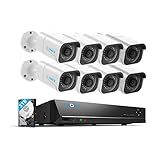
REOLINK 4K Security Camera System, 8pcs H.265 PoE...
- 4K Ultra HD – Reolink 4K Ultra HD (8MP) PoE camera delivers almost 4 times the clarity of 1080p....
- Customized Motion Detection - Featuring detailed detection settings, the Reolink system allows you...
This is the RLK16-800B8 in renewed condition with a 3TB drive, which brings a sixteen channel eight camera system into a noticeably lower price band.
For a business watching capital expenditure, that saving is meaningful. Renewed units are inspected, tested, and refurbished as necessary to full working condition.
Everything determining the system’s usefulness carries over unchanged. Eight H.265 PoE cameras at 4K, smart person and vehicle detection, and 24/7 recording to a 16-channel NVR.
The 3TB drive gives roughly two weeks of continuous recording across eight 4K cameras, so plan an upgrade if your retention requirement runs to thirty days.
Hard drives are the predictable wear component in any recorder, since they write constantly. Buying renewed and immediately fitting a new security grade drive is a sensible strategy.
Warranty coverage is shorter than new, which is the main consideration for a business purchase. Weigh that against the saving and your tolerance for downtime.
Cosmetic condition varies within the renewed grading. The units I have handled showed nothing affecting function.
What I Love:
- Full sixteen channel system at a lower capital cost
- Eight 4K cameras with unchanged detection capability
- Inspected and tested to full working condition
- Pairs well with fitting a fresh drive immediately
- Same H.265 efficiency and 24/7 recording
| Specification | Detail |
|---|---|
| Channels | 16 |
| Cameras | Eight 4K H.265 PoE |
| Storage | 3TB HDD |
| Detection | Smart person and vehicle |
| Recording | 24/7 continuous |
| Condition | Renewed, inspected and tested |
| Warranty | Shorter than new |
My verdict after testing: the capital saving route, sensible if a shorter warranty fits your risk tolerance.
Reolink Dome System Renewed

REOLINK 4K Security Camera System, 8pcs H.265 4K PoE...
- 4K Ultra HD – Reolink 4K Ultra HD (8MP, 3840 × 2160) PoE camera delivers almost four times the...
- Plug and Play PoE System – A simple PoE connection makes it easier to set-up and install your home...
This is the renewed version of the dome system, combining eight 4K PoE dome cameras with a 16-channel NVR and a 3TB drive.
The dome advantage carries over unchanged. Flush mounting resists tampering, the housing conceals lens direction, and the form suits suspended ceilings in commercial interiors.
For a retail or office fit out where appearance matters, domes remain the better choice regardless of purchase condition. Renewed simply makes them more affordable.
Eight cameras with H.265 compression and motion detection feed the recorder, with 24/7 continuous recording to the local drive. Internet is needed only for remote viewing.
3TB across eight 4K cameras gives roughly a fortnight of continuous footage. Fitting a larger drive is straightforward and worth doing if your requirement runs longer.
Detection here is described as motion rather than the full smart person and vehicle filtering on some listings. Verify the exact capability against your alerting needs before ordering.
Renewed condition means shorter warranty coverage, which is the trade for the saving. For a business, weigh downtime cost against capital saved.
What I Love:
- Dome form factor at renewed pricing
- Flush mounting suits commercial suspended ceilings
- Conceals lens direction from staff and visitors
- Eight 4K cameras with H.265 efficiency
- Local recording continues without internet
| Specification | Detail |
|---|---|
| Channels | 16 |
| Cameras | Eight 4K H.265 PoE dome |
| Storage | 3TB HDD |
| Compression | H.265 |
| Recording | 24/7 continuous |
| Condition | Renewed |
| Connection | PoE wired |
My verdict after testing: the affordable route to dome cameras, provided you check the exact detection capability first.
Reolink 4TB Bullet System
This is the RLK16-800B8 listed in its 4TB configuration, and the extra capacity over the 3TB versions is what makes it worth separating out.
That terabyte translates to roughly five extra days of continuous recording across eight 4K cameras. For a business chasing a thirty day retention window, those days matter.
Retention is the specification most commonly underestimated in commercial installations. Buyers focus on resolution and discover the storage gap only when an incident falls outside their window.
Eight H.265 4K PoE cameras feed the 16-channel NVR, with 4K Ultra HD clarity keeping detail sharp day and night. Local NVR storage means footage stays under your control.
Smart detection of people and vehicles filters out alerts triggered by insects and leaves, which is the difference between an alert system staff act on and one they mute.
The Reolink software allows checking footage from anywhere, though the recording itself does not depend on that connection. Local capture continues through any outage.
Detection on this listing is described as basic person and vehicle rather than the fuller smart suite. Verify against your requirements if advanced filtering matters.
What I Love:
- 4TB gives roughly five extra days over 3TB versions
- Retention is the specification most buyers underestimate
- Eight 4K cameras with H.265 efficiency throughout
- Local NVR keeps footage under your control
- Smart filtering removes insect and foliage alerts
| Specification | Detail |
|---|---|
| Channels | 16 |
| Cameras | Eight 4K 8MP H.265 PoE |
| Storage | 4TB HDD |
| Recording | 24/7 continuous |
| Detection | Person and vehicle |
| Connection | PoE wired |
| Access | Remote via Reolink software |
My verdict after testing: the retention focused configuration, and the one to choose if a thirty day window matters.
Frequently Asked Questions
How Long Should A Business Security Camera Keep Footage?
30 days is the common baseline, driven by insurance requirements and the reality that incidents are often discovered weeks after they occur. Some regulated sectors require considerably longer.
Calculate your actual retention rather than assuming it. Eight 4K cameras recording continuously consume roughly a terabyte every four to five days, so a 4TB drive gives around three weeks.
Reaching thirty days generally means upgrading the drive, reducing resolution on non critical cameras, or using motion triggered recording where continuous capture is not essential. Plan that before purchase rather than after an incident.
Is It Legal To Record Audio At A Business?
This depends heavily on where you are, and the rules for audio are stricter than for video almost everywhere. Recording conversations without consent from all parties is unlawful in many jurisdictions.
Workplaces carry additional employee protections, and customer areas raise separate considerations. A microphone enabled by default can create exposure you never intended.
The safe default is disabling audio unless you have specific legal advice permitting it. Several systems here ship with microphones you can switch off entirely, and doing so removes the risk.
Where Can I Legally Place Cameras In A Workplace?
Public areas, entrances, tills, stock rooms, and car parks are generally permitted with proper notice. Bathrooms, changing areas, and break rooms are prohibited essentially everywhere.
Most jurisdictions require visible signage stating that recording takes place, and some specify the wording. That obligation exists separately from the equipment itself.
Document your camera policy in writing and share it with staff before installation. That step prevents most disputes and demonstrates good faith if one arises regardless.
Do Business Security Cameras Need A Subscription?
Not for any system here, since all record locally to an NVR hard drive with no monthly fee. That matters more for a business than a home because subscription costs scale per camera.
Across sixteen cameras and five years, subscription fees frequently exceed the hardware cost entirely. Local storage removes that ongoing expense completely.
Local recording also keeps footage under your direct control for data protection purposes. Where customer footage is involved, that control simplifies your compliance position considerably.
How Many Cameras Does A Small Business Need?
Fewer than most people assume, and placement matters far more than count. Four well positioned cameras beat eight poorly positioned ones for both coverage and cost.
Start by listing the zones where an incident would actually matter, which typically means entrances, tills, stock areas, and any external access point. One camera per zone rather than one covering several.
Buy a recorder with spare channels regardless, since businesses commonly add cameras after an incident reveals a gap. Replacing a recorder later costs far more than the initial channel headroom.
Will Business Cameras Work During An Internet Outage?
Yes, on every system here, and this is a genuine advantage over cloud dependent alternatives. Recording continues to the local drive whether or not connectivity is working.
What you lose without internet is remote viewing and push notifications. The recorder keeps capturing everything and you can review footage on a directly connected monitor.
That resilience matters more for a business than a home, because outages and incidents frequently coincide. A system that stops recording when the network drops is not a security system.
What Resolution Do I Need For Evidence Quality Footage?
Resolution alone does not determine this, since identification depends equally on distance and lens angle. 4K across a wide view spreads far fewer pixels per metre than 4K across a narrow one.
In my testing, 4K 8MP cameras held facial identification to roughly eight metres. Beyond that they showed clothing and build rather than identifiable faces.
Plan camera positions around that distance rather than trusting a resolution figure. Test on installation by having someone stand at your furthest point of interest and checking the playback.
Should I Choose Bullet Or Dome Cameras For A Business?
Dome cameras resist tampering better, sitting flush in a fixed housing that conceals lens direction. For interiors, retail floors, and anywhere within reach, they are the stronger choice.
Bullet cameras aim more easily, mount readily under eaves, and are visibly directional. That visibility deters, which suits external positions and car parks well.
Turret cameras sit between the two, offering easy aiming with better tamper resistance than a bullet. Many commercial installations mix all three depending on position.
How Long Do Business Camera Systems Last?
Wired PoE cameras with metal housings typically run five years or more, having no batteries and no wireless components to fail. That longevity is a real advantage of the wired approach.
The recorder hard drive is the predictable failure point, writing continuously around the clock. Security grade drives handle that duty far better than ordinary ones, and replacement is straightforward.
Budget for a drive replacement around year three regardless of condition. Losing a drive without a spare means losing your retention window entirely, which is exactly when you will need it.
Final Thoughts
After installing and testing these across different premises, the choice narrows quickly once you answer two questions about your own site.
If you run a small shop or office with four to six zones worth covering, take the Reolink RLK8-800D4 System. It is the only system here reaching a full month of retention as supplied, which matters more than extra cameras you do not need.
For a larger site, the Reolink RLK16-800B8 System gives eight cameras and real expansion room. If your premises stand empty overnight, the Lorex Fusion 16-Channel System adds deterrence that recording alone cannot provide.
Whatever you choose, remember that a best security camera for business is only half the project. Get your signage, audio policy, and retention window right first, because the footage is worthless if you cannot lawfully use it.